Business Central Themes: Bitta Theme 1.2 Adds Styles
Six styles, two light themes, saved custom themes and better sandbox colors for the environment bar
On this page
Bitta Theme for Business Central now goes well beyond dark mode. Version 1.2 of the free browser extension from Bitta Apps adds Business Central themes for light and dark preferences, six visual styles, and custom themes that can be saved by name. The environment color bar, which names the environment and company on every page, also handles sandbox names better. The update is live on the Chrome Web Store.
This article covers what changed since the first release, how the new styles work, and how each release is tested for readable text.
A better default for sandbox colors
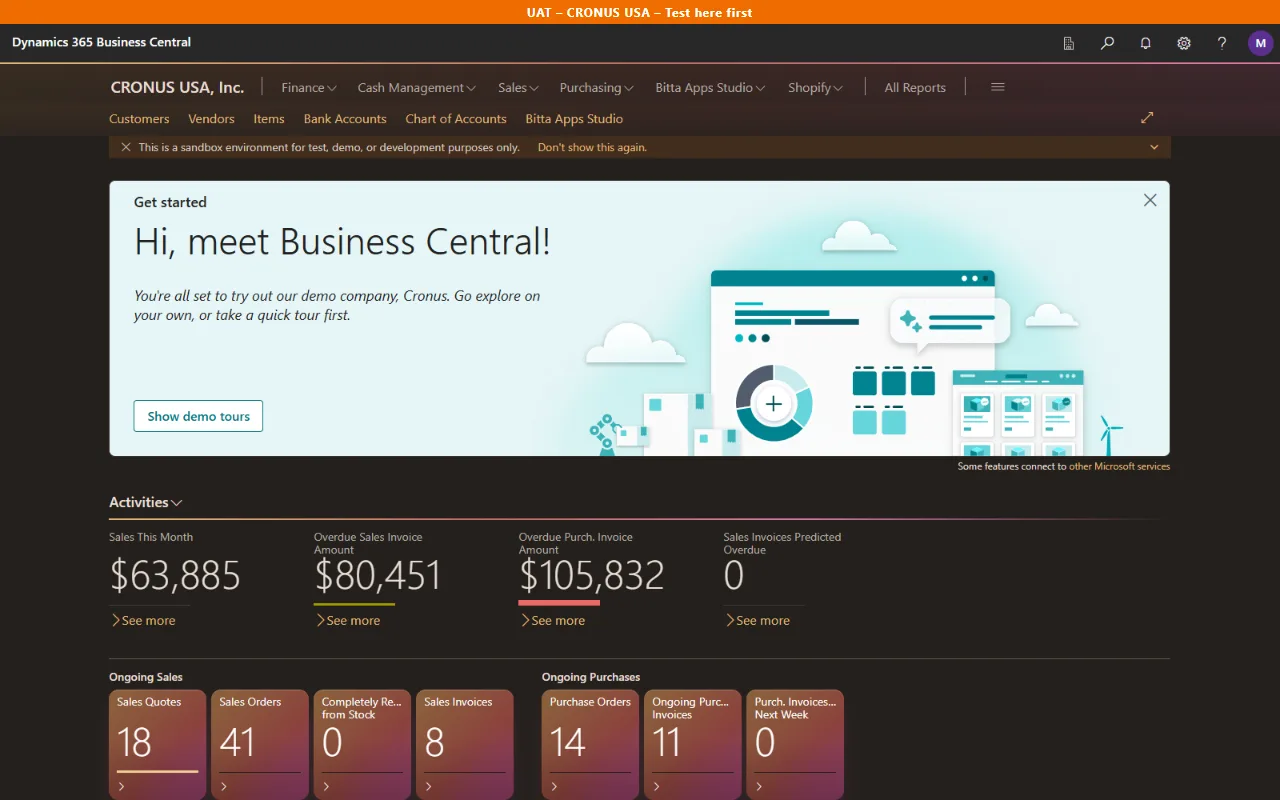
The color bar reads the environment from the page address and the company from the page, then shows both in large type across the top of every page. Production environments are red by default. Sandboxes and everything else get a second color.
Microsoft describes production and sandbox environments as serving different purposes, and a sandbox can be created as a copy of production data. Those copies often carry names such as "ProdCopy", and the first release treated any name containing "prod" as production. Customer feedback showed sandboxes turning red as a result.
Version 1.1 fixed this. "Production", "PROD" and "Prod-US" stay red. "ProdCopy" and "Prod-Test" get the sandbox color, so a newly created sandbox needs no setup. Both default colors can be changed in the popup.
Each environment can also have:
Its own color, set once and kept
A short message shown in the bar, such as "Test here first"
A remove button, so deleted sandboxes no longer clutter the list
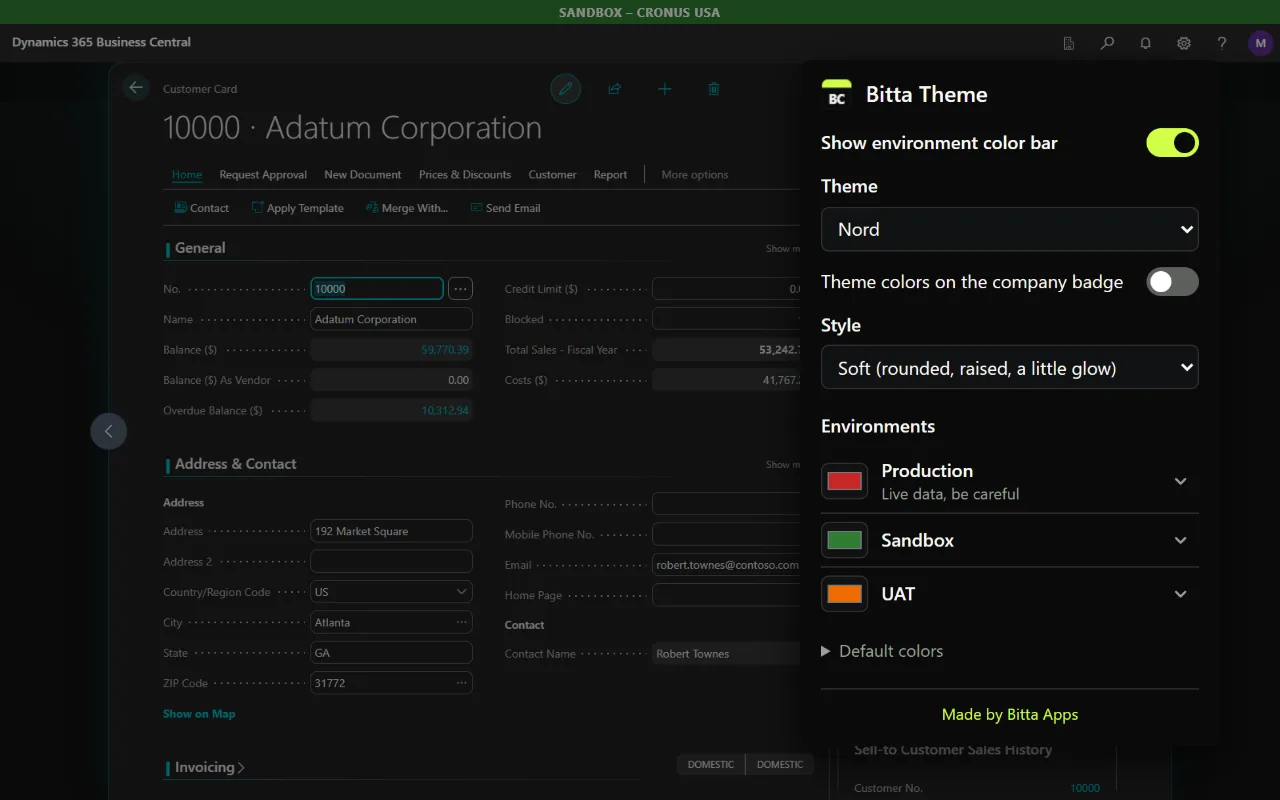
Twelve themes, including two light ones
The theme list now has Off (standard Business Central), Dark, Dim, High contrast, Midnight, Nord, Dracula, Solarized, Mocha, Paper, Frost and Custom.
Paper is a warm cream light theme, and Frost is a cool blue-gray light theme.
Midnight, Nord, Dracula, Solarized and Mocha each carry their own link and tile colors. Nord uses frost blue links and slate tiles. Mocha uses gold links and brown tiles.
Custom has four colors side by side: background, text, links and tiles. A light background makes a light theme, and a dark background makes a dark theme. Up to 12 custom themes can be saved by name and picked from the same list.
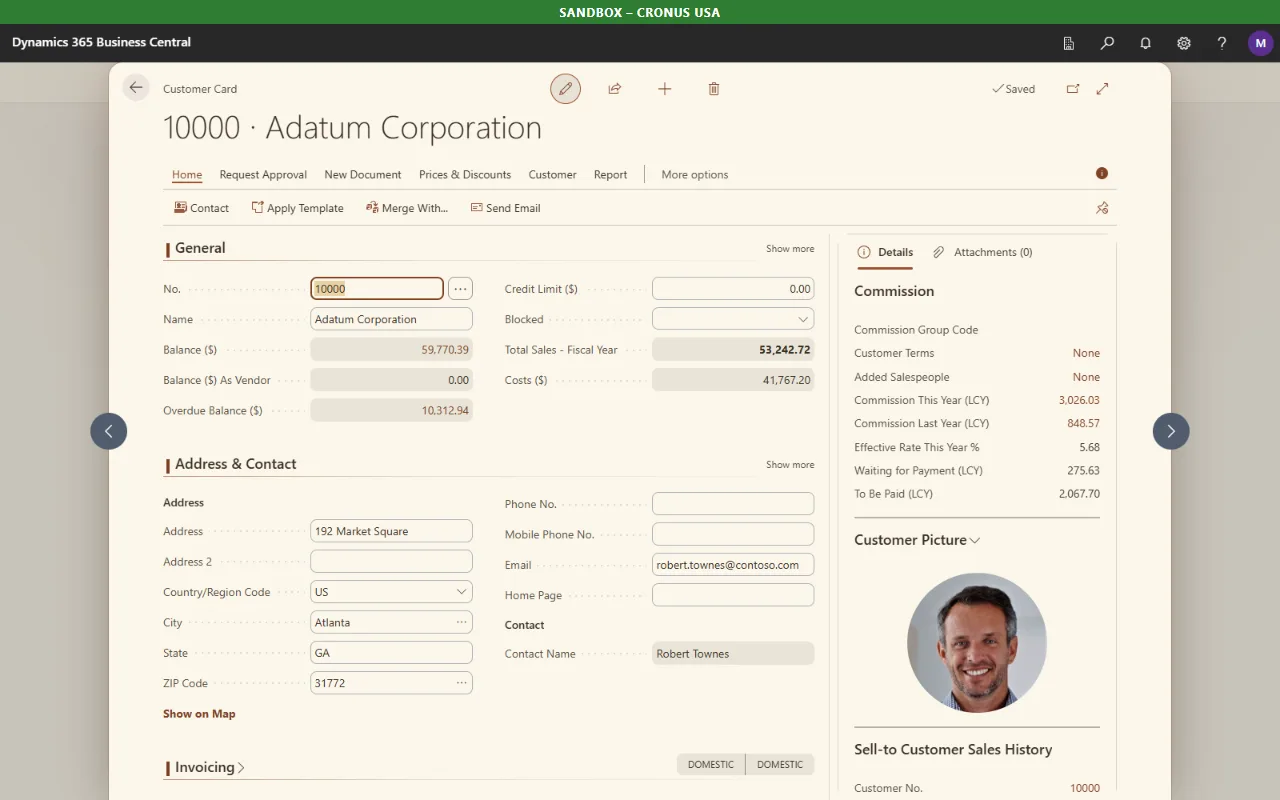
Status colors keep their meaning in every theme. Green, amber and red indicators, photos and charts keep their colors. The company badge set on the Company Information page keeps its color by default, with an option to let the theme recolor it.
Six styles
Themes change color. Styles change shape, depth and motion, and they work with any theme, including Off.
Classic: the standard Business Central look.
Soft: rounded tiles, fields, menus and dialogs. A page opened over another page floats in as a rounded sheet, and the page behind it dims in the theme's color.
Crisp: thin lines, small accent bars and sharp focus rings.
Neon: glowing edges and a lit current row, toned down on light themes.
Glass: a frosted, layered look for tiles and panels.
Aurora: tiles that blend through the theme's own colors, with a soft wash across the header.
Each style has its own hover effect for action bar icons. The effects are short and turn off when reduced motion is set in the operating system.
Styles are built from CSS only. They add no scripts to the page and use no blur effects, because blur slows down scrolling in long lists. They do not change field sizes or the grid. The one layout change is extra space between card sections in some styles.
How each release is tested
Every release runs an automated Playwright suite against two targets: a Business Central server with CRONUS demo data, and a Business Central online sandbox. The suite opens the Role Center, a list, a card, a sales order with its FactBoxes and action bar, a confirm dialog, a lookup and a report request page. It does this in every theme and style combination and saves a screenshot of each.
Two checks run on every screenshot:
An automated accessibility check on visible text, against the WCAG 2.2 contrast minimum of 4.5:1 for normal text at Level AA.
A pixel check for text on gradients, where the standard check cannot measure. It hides the text, captures what is behind it, and measures contrast against the actual pixels.
The 1.2 release run produced 612 screenshots across both targets with no contrast failures. All Business Central page selectors live in one source file, so when a Business Central update changes the page, there is one place to fix and the same suite shows what changed.
Privacy and scope
The scope is the same as in version 1.0:
It works with Business Central online at businesscentral.dynamics.com.
It asks for two permissions: storage for settings, and access to Business Central pages.
It collects no user data and has no analytics or tracking. Settings, including saved themes and bar messages, stay in the browser's settings storage, which the browser may sync if browser sync is turned on.
On Business Central online, Microsoft serves the page stylesheets in a way an extension cannot read directly. Bitta Theme downloads those same public stylesheet files again, without cookies, so it can recolor them. No user data is sent.
It changes how pages look in the user's own browser. It does not change Business Central data, configuration, or what other users see.
The extension installs from the Chrome Web Store in Google Chrome. Microsoft Edge can install Chrome Web Store extensions once "Allow extensions from other stores" is turned on.
Bitta Theme is an independent extension and is not made by or affiliated with Microsoft.
What comes next
The next update is in review with Google. In it, Custom uses the four picked colors exactly as chosen. When a color may be hard to read, a Fix readability button appears, and nothing changes unless it is clicked.
Environment colors pair well with an issue report from ShowMe for Business Central, since a screenshot that shows the environment name removes any doubt about where a test ran. A Business Central Environment Snapshot is a good moment to confirm which environments a tenant has before a team agrees on colors. Feedback on themes, styles and environment handling can be sent through the Bitta Apps contact page.
Frequently asked questions
What is new in Bitta Theme 1.2?
Six visual styles, the light themes Paper and Frost, five color presets with their own link and tile colors, and Custom themes that can be saved by name. Version 1.1 also changed the environment bar so sandboxes named after production get the sandbox color.
Do the styles slow down Business Central?
The styles are built from CSS only. They add no scripts to the page and avoid blur effects, which slow down scrolling in long lists.
Can Bitta Theme make Business Central lighter instead of darker?
Yes. Paper and Frost are light themes, and a Custom theme with a light background produces a light theme with dark text.
Does Bitta Theme work in Microsoft Edge?
Microsoft Edge can install extensions from the Chrome Web Store once Allow extensions from other stores is turned on.
Does Bitta Theme collect any data?
No. It has no analytics or tracking. Settings stay in the browser's settings storage, which the browser may sync if browser sync is turned on.
Sources
Claims in this article were checked against the following on Oct 30, 2026.
- chromewebstore.google.com/detail/ogninhbhhbifjfioabijebglgkhneemk
- learn.microsoft.com/en-us/dynamics365/business-central/dev-itpro/administration/environment-types
- www.w3.org/WAI/WCAG22/Understanding/contrast-minimum.html
- support.microsoft.com/en-us/microsoft-edge/add-turn-off-or-remove-extensions-in-microsoft-edge-9c0ec68c-2fbc-2f2c-9ff0-bdc76f46b026