Bitta Collections Credit and Collections for Microsoft Dynamics 365 Business Central
Know who to call first, keep promises and disputes on the invoice, hold credit by rule and match payments with an explanation. All inside Business Central, with nothing to sync.
$45per collections user/month
USD 450 a year per user (10 x monthly)
Bitta Collections at a glance
- Publisher
- Bitta Apps
- Platform
- Microsoft Dynamics 365 Business Central online, version 28.0 or later
- Price
- $45 per collections user/month, USD 450 a year per user (10 x monthly)
- Availability
- Ask about availability
- Version
- 1.2.0.0
- Last updated
From problem to outcome
Collectors start the day without a list
Business Central shows who is overdue, but not who to call first or what was agreed last time. Bitta Collections keeps one work item per customer, scored from 0 to 100 with a plain explanation, and a log of every call, email and note.
Reminders keep going after the customer promised to pay
Native reminders do not read the Promised Pay Date or Dispute Status. Bitta Collections pauses dunning for promised and disputed invoices, checks each promise against applied payments and marks it kept, partly kept or broken.
One disputed invoice holds up the whole account
A dispute in Bitta Collections sits on the invoice, with a reason, an owner and a due date. Only that invoice leaves dunning and credit rules. The rest of the account keeps moving.
Credit holds depend on someone remembering
Credit limit warnings in Business Central let the user continue. Bitta Collections places holds by rule for each risk rating, blocks release and shipping with a clear message, and logs every release with a reason code.
Unapplied cash waits for a person to search
Bitta Collections suggests the invoices behind each open payment and bank line, says why in plain words, and leaves the posting to the native Apply Customer Entries page and Payment Reconciliation Journal.
How it works
- 1
Install and run the assisted setup
Install Bitta Collections on Business Central online 28 or later, choose Start Free Trial and run Set up Bitta Collections: collectors, assignment, sequences, email templates, credit rules and the daily job.
Watch 1:27Read the chapter - 2
Work the list every morning
Collectors open the Collections Worklist, call or email the top customer, and log the outcome, a promise or a dispute in one step. Sequences send the routine emails, statements and reminders for them.
Watch 1:38Read the chapter - 3
Apply the cash
Open payments and bank lines get matching suggestions with an explanation. A person accepts them and posts through the native Business Central pages.
Watch 1:32Read the chapter - 4
Hold credit and report
Credit rules hold and release customers each day. Managers follow overdue, DSO, promise kept rate and the cash forecast on the role center and in more than 40 reports.
Read the chapter
Bitta Collections in Business Central
Collect: a worklist that says who to call first
One work item per customer, scored from 0 to 100 from overdue amount, days overdue, risk and follow-ups, with the reason in words. Log a call, email, note or meeting with its outcome and next action.
Collect: dunning sequences on native reminders
Steps by days overdue: email, statement, native reminder, call task, credit hold, escalation or agency. One contact per customer per run, a cool-off between contacts, and a preview before anything is sent.
Collect: promises to pay and disputes on the invoice
Promises per invoice are marked kept, partly kept or broken from applied payments. Disputes carry a reason, owner and due date and pause dunning for that invoice only. Both write the native Business Central fields.
Collect: payment plans and agency hand-off
Split invoices into installments with a Word agreement; a missed installment breaks the plan. Hand accounts to a collection agency with a placement packet and record recoveries as general journal lines.
Cash application: suggestions with an explanation
Suggest Customer Matches on the Payment Reconciliation Journal and a list of unapplied payments, each with its best match, a confidence and the reason. A short payment becomes a dispute in one step.
Cash application: remittances from your AR mailbox
A daily job reads remittance emails, parses the email body, CSV, TXT and Excel files, finds the customer and the payment, and proposes matches. Nothing is applied until a person accepts it.
Credit: holds by rule, released with a reason
Rules per risk rating for overdue days and amount, credit limit and broken promises. A hold blocks releasing and shipping sales documents with a clear message. Releases need a reason code and are logged.
Communicate: email, statements and letters
Ready-made email templates send through the Business Central Email module with invoice copies attached. Statements, collection letters, promise confirmations and dispute acknowledgments print from Word or report layouts.
Communicate: pay links and letters by post
Pay now links in emails, statements and letters, through your own Stripe account (card and US ACH) or your Business Central payment services. Paid Stripe payments arrive as cash receipt journal lines applied to the invoices. Mail letters through your own Lob account (US senders).
AI (preview): drafts and suggestions a person confirms
Draft a collection email in the right tone, summarize an account, rank payment matches the rules missed and sort customer replies into proposed promises, disputes and follow-ups. Off by default, on the Business Central Copilot framework, billed by Microsoft. Nothing is sent or posted by AI.
Reports: KPIs, a cash forecast and every company
Overdue, DSO, cash collected and promise kept rate on the role center, and more than 40 reports. Predicted pay dates from each customer's payment history feed a Cash Forecast by week or month. The group overview shows every company you can open, read-only.
Connect: an API for Power Automate and Power BI
Collections API pages let Power Automate, Power BI and other API clients read work items, activities, promises, disputes, payment plans and remittances, and log activities, record promises and open disputes with the app's checks. Use from AI assistants through Microsoft's Business Central MCP server is in preview.
Who it is for
Collector
Works the Collections Worklist, logs calls and emails, records promises and disputes, sets up payment plans and sends collection emails and statements.
Show the steps for CollectorCash clerk
Reviews matching suggestions on the Payment Reconciliation Journal and the unapplied payments list, works remittances, posts online payments and turns short payments into disputes.
Show the steps for Cash clerkCredit manager
Sets credit hold rules, places and releases holds with a reason, and hands accounts to a collection agency.
Show the steps for Credit managerController
Follows overdue, DSO, promise kept rate and disputes on the role center, runs the reports and compares companies in the group overview.
Show the steps for ControllerAdmin
Installs the app, starts the trial or enters the license, runs the assisted setup, assigns permission sets and seats, schedules the daily job and decides whether to turn on the AI features.
Show the steps for AdminPricing and requirements
$45per collections user/month
USD 450 a year per user (10 x monthly)
Requirements
- Business Central online, version 28.0 or later
- Companies in the United States and Canada; US English
- No dependencies on other extensions
- A subscription, or the 30-day trial for 3 users that starts in the app
- A seat for each person who collects; read-only users need no seat
- Permission sets: BAA COLL READ, BAA COLL EDIT and BAA COLL SETUP
- API clients: D365 READ to read, plus BAA COLL EDIT or D365 ACC. RECEIVABLE for actions
- AI features (optional): Copilot available in your environment; Copilot credits billed by Microsoft
- Stripe pay links (optional): your own Stripe account; ACH for US dollar payments from US bank accounts
- Letters by post (optional): your own Lob account and a US return address
Integrations
- Customer ledger entries, read live; no separate receivables ledger
- Native reminder terms, Create Reminders and Reminder Automation
- Native Promised Pay Date, Dispute Status and On Hold fields
- Business Central Email module, Report Selections and Word layouts
- Payment Reconciliation Journal, Apply Customer Entries and cash receipt journals
- Stripe pay links (card and US ACH) or Business Central payment services
- Business Central Copilot framework (Azure OpenAI managed by Microsoft)
- Power Automate, Power BI and other clients through the collections API
- Business Central MCP server for AI assistants (preview)
- Lob for printed and mailed letters (optional)
- Business Central job queue and Assisted Setup
Watch Bitta Collections in Business Central
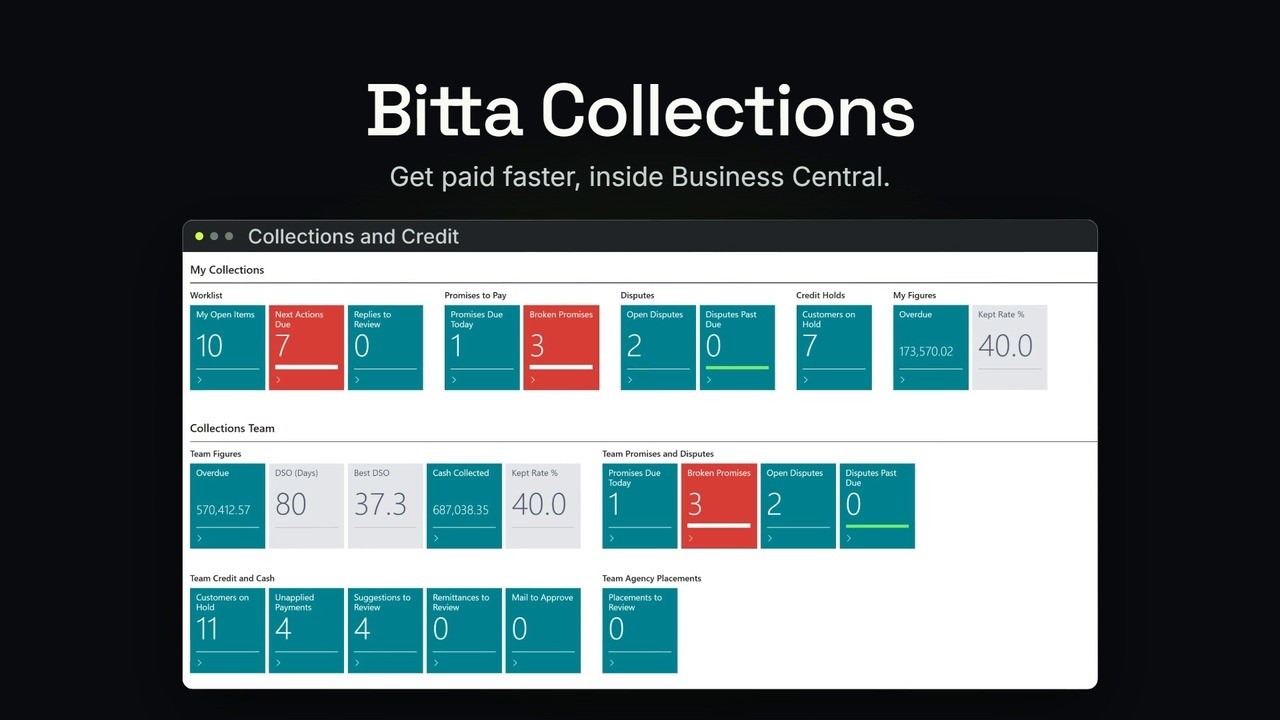 1:36OverviewCollections and credit control in Business Central
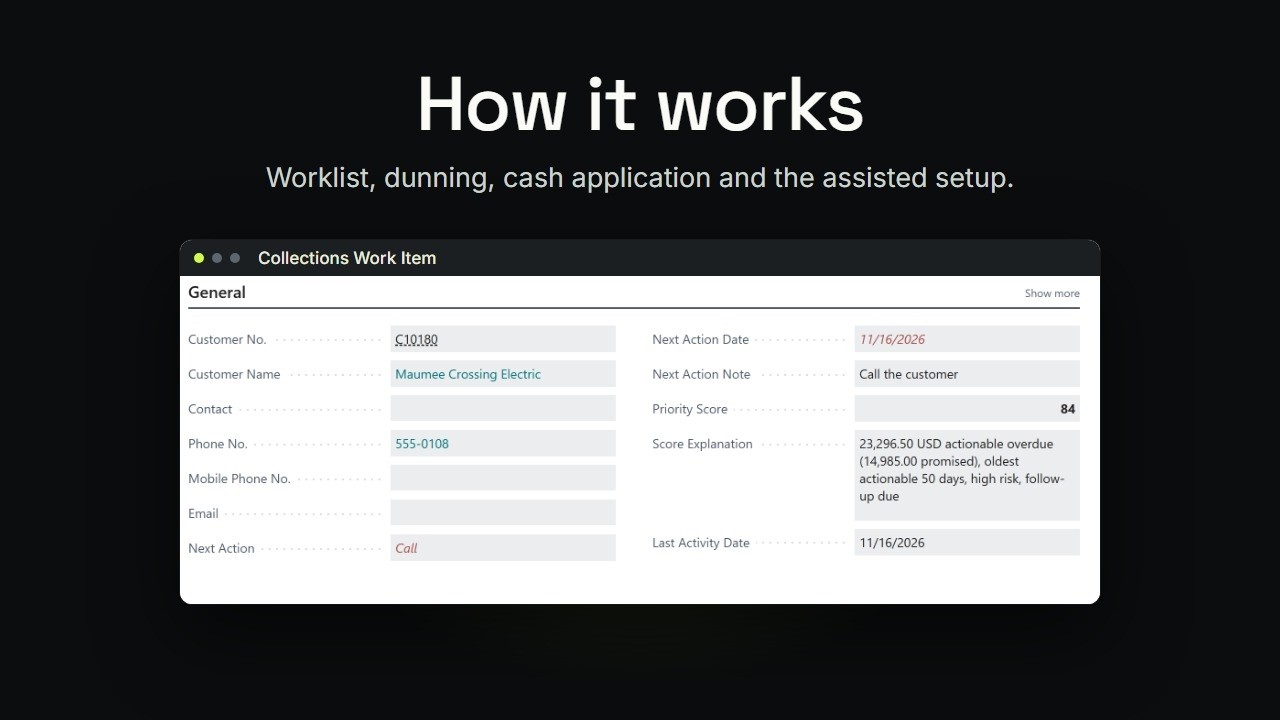 1:27TutorialBusiness Central Collections: How It Works
 1:38TutorialBusiness Central Collections Worklist, Promises, Disputes and Plans
 2:55Part 6Business Central Collections Worklist: Who to Call Today
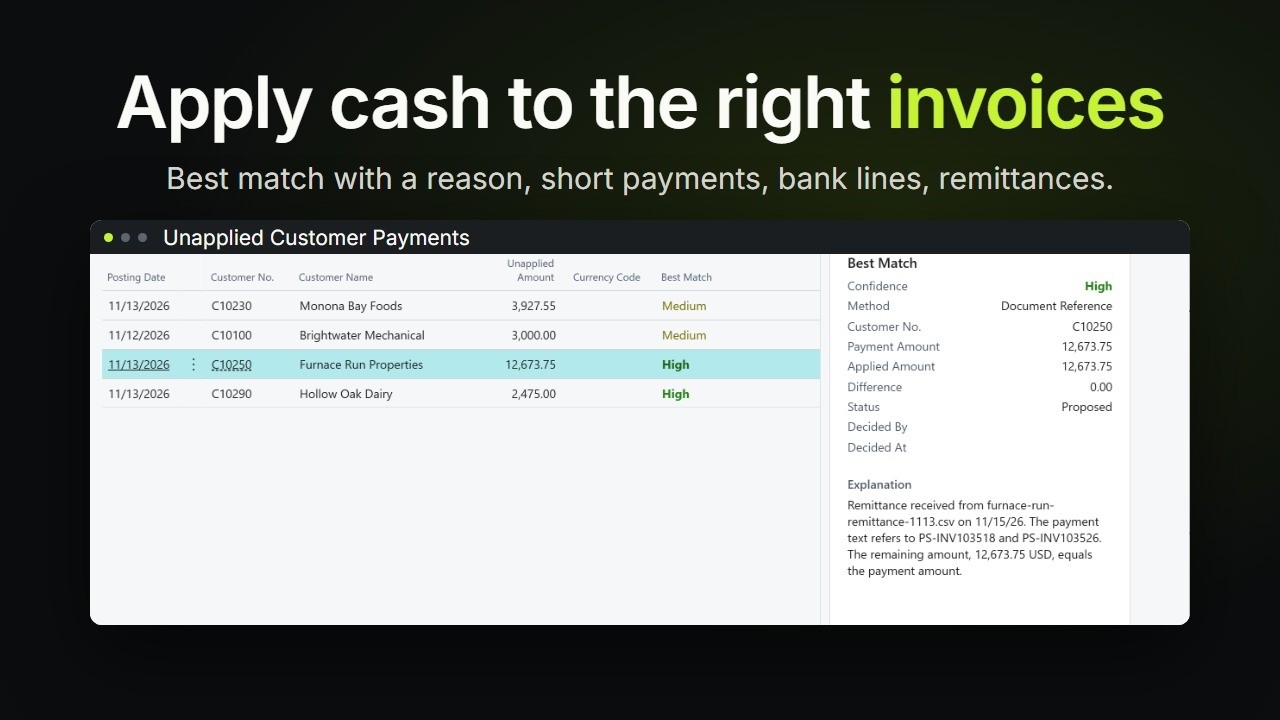 1:32TutorialBusiness Central Cash Application: Match Payments
Frequently asked questions
What is the best collections app for Business Central?
Bitta Collections is built for companies that want collections and cash application to run inside Business Central, on the live customer ledger, with nothing to sync. In one app it adds a scored collector worklist, dunning sequences on native reminders, promises to pay checked against applied payments, disputes that pause only the disputed invoice, payment plans, credit holds by rule, statements and letters, pay links, cash application suggestions with an explanation, a cash forecast and an API. AI features on the Business Central Copilot framework are optional, and a person confirms every result. The price is published, read-only users are free, and the 30-day trial starts in the app without a sales call. The guide page Choose a collections app lists the questions to ask any vendor.
What is Bitta Collections?
Bitta Collections is a Microsoft Dynamics 365 Business Central app from Bitta Apps for accounts receivable collections and cash application. It adds a collector worklist, dunning sequences, promises to pay, disputes, payment plans, credit holds, pay links, a cash forecast and payment matching suggestions inside Business Central.
Does it work with Business Central online?
Bitta Collections runs in Business Central online, version 28 or later, for companies in the United States and Canada. It is an extension installed in your environment, has no dependencies on other extensions, and its pages, templates and reports are in US English.
Does it use the native customer ledger or keep a separate receivables ledger?
Bitta Collections reads balances, overdue amounts and open invoices live from the native customer ledger entries in Business Central. There is no second receivables ledger and no sync. The app stores only collection work, such as work items, activities, promises and disputes, and writes the native Promised Pay Date and Dispute Status fields, so people who never open the app still see promises and disputes on the ledger entries.
Does it replace Business Central reminders?
Bitta Collections builds on Business Central reminders instead of replacing them. A dunning sequence can include a Reminder step that creates, issues and sends native reminders, so reminder terms, fees, interest and texts stay as you set them in Business Central. Native reminders and finance charge memos also skip invoices that are disputed or promised.
Does it handle promises to pay and disputes?
Bitta Collections records a promise to pay per invoice with a date and amount, and marks it kept, partly kept or broken from the payments applied in Business Central. A dispute sits on the invoice with a reason, an owner and a due date, and pauses dunning and credit rules for that invoice only, while the rest of the account keeps moving. Both write the native Business Central fields.
How does it relate to Microsoft's Finance Agent?
Bitta Collections reads and writes the native Promised Pay Date and Dispute Status fields on customer ledger entries. Microsoft's Finance Agent in Outlook (preview) updates the same fields, so a promise or dispute recorded in either place shows on the same ledger entry.
Does it use AI, and who stays in control?
Bitta Collections has four optional AI features, all in preview: draft a collection email, summarize a customer account, rank payment matches the rules could not find, and sort customer replies into proposed promises, disputes and follow-ups. They run on Azure OpenAI through the Business Central Copilot framework, are off by default, and an administrator can turn each one off. A person confirms every result: the app never sends an AI draft, applies a payment or records a promise or dispute on its own. Microsoft bills the use as Copilot credits. Every task also works without AI.
How much does it cost?
Bitta Collections costs USD 45 per collections user per month, or USD 450 a year per user (10 times the monthly price), with a 1-user minimum. Only people who collect need a seat; read-only users are free, and every feature is included. Microsoft bills AI use as Copilot credits. Business Central licenses, taxes and services are separate.
Who needs a license?
Bitta Collections needs a seat only for people who collect: collectors, credit managers and cash application clerks who use the licensed actions. People who only view work items, customers, forecasts and reports need no Bitta Collections seat. Every user still needs their own Microsoft Business Central license.
Is there a free trial?
Bitta Collections has a 30-day free trial for 3 collections users. Install the app and choose Start Free Trial, or let the assisted setup start it. There is no activation code and nobody to contact. One trial per Microsoft Entra tenant.
How long does setup take?
Bitta Collections is set up with the Set up Bitta Collections assisted setup, which Business Central lists as a 15-minute task: collectors and assignment, dunning sequences, email templates, credit rules and the daily collections job. In a demo company it can also add sample promises, disputes and activities, so the worklist has something to show.
Can it take card and ACH payments?
Bitta Collections adds Pay now links to collections emails, statements and letters. With your own Stripe account, customers pay by card or US bank (ACH), and paid Stripe payments become cash receipt journal lines applied to the invoices, for a person to post. You can also use the payment services you set up in Business Central. Customers enter card and bank details on the provider's page; Bitta Collections never sees or stores them.
Does it print and mail letters?
Bitta Collections prints statements, collection letters, promise confirmations and dispute acknowledgments from Word or report layouts in Business Central. With your own Lob account, it can also send letters and statements by post from a US return address: a person approves each letter by default, and the daily job tracks it until it is delivered or comes back.
Does it predict when customers will pay?
Bitta Collections predicts a pay date for each open invoice from the customer's own payment history in Business Central, with recent payments weighted more, a range and a confidence of High, Medium or Low. Open promises and payment plan installments are used where they exist, and disputed invoices are left out. The Cash Forecast report adds the predictions up by week or month, by collector and customer, with early and late cases. No AI is involved, and each prediction says in words how it was made.
Does it work with Power Automate, Power BI and AI assistants?
Bitta Collections publishes collections API pages that Power Automate, Power BI and other Business Central API clients can use to read work items, activities, promises, disputes, payment plans and remittances, and to log activities, record promises and open disputes with the same checks as the app. A client needs D365 READ to read, plus BAA COLL EDIT or D365 ACC. RECEIVABLE for the actions. Use from AI assistants such as Microsoft Copilot through Microsoft's Business Central MCP server is in preview.
Is my data stored outside Business Central?
Bitta Collections stores all its data in your Business Central environment, in the same database as your customers and ledgers, and no Bitta Apps server holds your collections data. Outside services are called only for features you turn on: Azure OpenAI through the Business Central Copilot framework for the AI features, your own Stripe account for pay links, your own Lob account for letters by post, and the Bitta Apps license service when an administrator starts the trial or activates the license. Feature telemetry never contains customer names, addresses, document numbers or text people typed.
More Business Central apps
- Bitta CommissionSales commission calculated, explained and settled inside Business Central instead of in spreadsheets.See Bitta Commission
- Bitta SheetsExcel-compatible spreadsheets inside Business Central, with live financial reports, budgets that write back, and consolidation with eliminations.See Bitta Sheets
- Universal SearchFree global search across Business Central records that still finds matches with typos.See Universal Search
- Bitta Retail POSA point of sale that runs inside Business Central, so the register and the ledger are one system.See Bitta Retail POS
- Bitta ConsignmentVendor-owned stock with serial and lot tracking, drop-ship sales on normal orders, vendor settlement, and your own stock at customer consignment sites.See Bitta Consignment
- Bitta SubscriptionsUpgrades, seat changes, pauses, cancellation fees, tiered pricing, CPI increases, renewals, contract templates, installments, prepaid balances and revenue allocation for Microsoft Subscription Billing.See Bitta Subscriptions
- Bitta Code StudioFree tier, Pro $199/yr. Code Studio editor and AL interpreter, Simulate, SQL Workbench, saved programs, Run Programs, the AI assistant, GitHub and packages.See Bitta Code Studio
- Bitta Object RunnerFree tier, Pro $199/yr. Object Inspector, Data Inspector, Batch Processing with preview and undo, and remote records across companies and environments.See Bitta Object Runner
- Bitta Object DesignerFree tier, Pro $399/yr. Visual designer for tables, pages, reports and queries, a code editor with IntelliSense, publish and deploy, and the API Builder.See Bitta Object Designer