One Small Business Central Customization: How Technical Debt Builds
On this page
- Customization is not automatically technical debt
- How one field becomes a dependency chain
- Seven warning signs that the debt is building
- No named owner
- The reason is undocumented
- Tests depend on one person's memory
- Integration assumptions live outside the contract
- Obsolete platform elements are ignored
- Telemetry cannot show use or failure
- Every update starts with emergency discovery
- A practical customization decision framework
- What maintainable extension work looks like
- Reduce existing debt without rebuilding everything
- Reusable customization approval checklist
- Approve the obligation, not just the feature
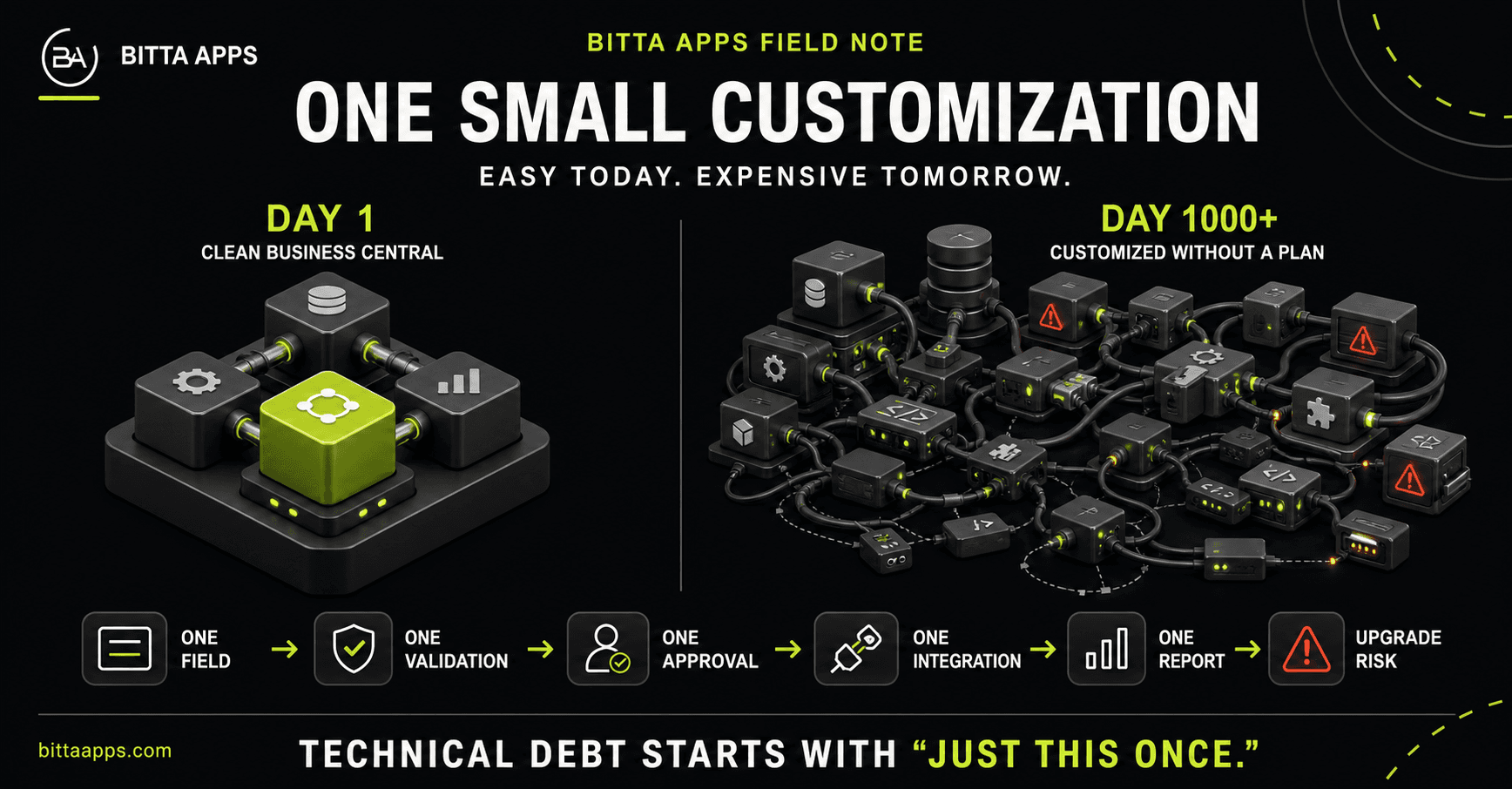
Image description: Bitta Apps comparison of clean Business Central architecture on day one with a tangled customization dependency network on day 1000.
"It is only one field."
The request can be completely reasonable. A purchasing team needs one field to record a supplier commitment. Then the field needs validation, the validation affects an approval, the approval must reach an integration, and the integration feeds a report. Before long, changing the original field requires someone to understand a chain that crosses business rules, security, data, tests, monitoring, and ownership.
The first request gets a ticket. The fifteenth sometimes arrives as a message asking whether it can be ready before lunch.
The lesson is not "never customize Business Central." The lesson is to approve the obligation that comes with a customization, not just the screen change people can see.
Customization is not automatically technical debt
Martin Fowler describes technical debt as deficiencies in internal quality that make future modification harder, with the extra effort acting like interest. That distinction matters. A well-designed extension that supports a valuable business requirement, has a named owner, and can be tested and updated is an asset. Debt begins to accumulate when the business keeps the behavior but stops managing the conditions that make it safe to change.
A deliberate tradeoff can be responsible. For example, a team may accept a temporary manual reconciliation to meet a deadline, document the limitation, name an owner, and schedule a review. An undocumented shortcut with no review trigger is different. The request may still work today, but nobody has agreed to pay for its future maintenance.
How one field becomes a dependency chain
Business Central provides supported AL extension objects for tables, pages, reports, enums, and permission sets. These objects can add fields, actions, layouts, report elements, enum values, and permissions without editing the base object directly, as described in Microsoft's extension objects overview. That supported model is the right foundation, but it does not make every design equally maintainable.
- Field: A table extension stores the value, and a page extension exposes it.
- Validation: AL logic defines allowed values and when the field becomes mandatory.
- Approval: A posting or approval path now depends on the new value.
- Integration: An external system sends, receives, or interprets the value.
- Report: A document or analysis uses the value and inherits its assumptions.
- Permissions: Someone must decide who can view, edit, approve, or troubleshoot it.
- Operations: Tests, telemetry, documentation, deployment, and support must follow the whole chain.
Events can help separate custom functionality from core business logic. Microsoft notes that events are designed for this separation and can lower the cost of modifications and upgrades, while also warning that event quality varies and some line-specific hook events can be fragile when code changes. See Microsoft's event extensibility guidance. The design question is therefore not merely "Did we use an event?" It is "Did we choose a stable boundary whose meaning will remain clear?"
Dependencies can also cross apps. In the Marketplace library and dependency app scenarios covered by Microsoft's FAQ, Business Central walks the declared library and dependency chain for a top-level Marketplace app. The FAQ also says a library or dependency app is updated with the consuming Marketplace app only when that consuming app requires a higher minimum version in its manifest than the version already installed. Review the current library and dependency app guidance. These behaviors are specific to the FAQ's Marketplace app context and should not be generalized to every Business Central deployment model. Within that context, a small consuming app can carry a release-order obligation that is invisible on its page.
Risk is not measured well by counting AL objects alone. One isolated report can be low risk. One field used by posting, approvals, an API contract, and month-end reporting can be high risk. What matters is the number and quality of dependencies, how often they change, and whether the team can see and test them.
Seven warning signs that the debt is building
No named owner
The requester is known, but the long-term owner is not. Nobody is accountable for deciding whether the feature still matters, approving changes to it, or funding its maintenance.
The reason is undocumented
The ticket says what to build but not which business outcome or control it supports. Future reviewers cannot tell whether standard functionality now covers the need or whether the original process has changed.
Tests depend on one person's memory
Microsoft supports AL test codeunits, test methods, and test runners that can execute unattended. Its application testing guidance recommends repeatable tests that start from a known state and validate successful and failing conditions. If the test plan is "ask the person who built it," the plan also has a vacation problem.
Integration assumptions live outside the contract
Required fields, payload meanings, retries, duplicate handling, and ownership are understood socially but not recorded. A validation change can then break a downstream process even when the extension compiles.
Obsolete platform elements are ignored
AL provides obsoletion states, reasons, tags, and analyzer rules to communicate lifecycle changes and detect several categories of breaking change. A warning without an owner and migration decision is future work waiting for an inconvenient date. Microsoft's current reference is obsolete objects, methods, and symbols in AL.
Telemetry cannot show use or failure
Business Central app telemetry can send extension activity to Azure Application Insights, and extensions can add feature or custom telemetry. Microsoft's telemetry setup guidance explains the supported options. Without relevant signals, the team cannot easily distinguish a critical feature from an unused one or a code fault from a process problem.
Every update starts with emergency discovery
The team repeatedly reconstructs dependencies, test cases, data behavior, and deployment order just before an update. Upgrade weekend is an expensive time to discover that a report is held together by oral tradition.
A practical customization decision framework
Before approving development, move through these questions in order. The goal is not to avoid AL. It is to choose the simplest boundary that clearly owns the requirement.
- What outcome is required? Describe the decision, control, transaction, or customer result, not the requested field or button.
- Can standard Business Central support it? Confirm current capability before assuming a gap.
- Can configuration or process design solve it? Consider setup, dimensions, workflows, permissions, and a clearer operating procedure.
- Does the requirement justify an AL extension? Use AL when the behavior belongs inside the Business Central transaction and the value justifies its lifecycle obligations.
- Is an external integration a clearer boundary? Keep orchestration outside Business Central when another system owns the process, but define the contract, retries, reconciliation, security, and support owner.
- What must remain true after the next update? Name the acceptance tests, data guarantees, performance expectations, dependency versions, deployment sequence, and rollback or recovery path.
- Who owns the full lifecycle? Assign support, documentation, telemetry, testing, upgrade review, and retirement decisions.
A useful approval statement is: "We are choosing this solution because it is the clearest supported boundary for the business outcome, and these named people own the conditions that keep it maintainable." If the group cannot finish that sentence, the request is not ready for approval.
What maintainable extension work looks like
- Supported extension objects: Add behavior through supported AL extension mechanisms and documented extensibility points.
- Intentional events: Prefer events that represent stable business or operation boundaries, and document why each subscriber exists.
- Explicit app dependencies: Record dependency apps and minimum versions, then test the install and update sequence. For deeper release mechanics, use the Bitta Apps guide to AL extension upgrade strategies.
- Repeatable tests: Put important posting, approval, integration, and failure paths in AL tests that can run without a person's memory. The companion guide on AL test automation covers handlers, isolation, and upgrade-safe tests.
- Operational evidence: Add telemetry where it can answer a support or product decision, then define who reviews it and what action a signal should trigger.
- Lifecycle discipline: Track obsolete symbols and analyzer findings before they become blockers.
- Data-safe changes: Treat schema changes as data changes. Microsoft's schema synchronization guidance distinguishes synchronization options and warns that ForceSync is for testing and development, not production.
- Scenario-based performance checks: For high-volume or concurrency-sensitive work, Microsoft describes the Business Central Performance Toolkit as a way to simulate realistic workloads and compare solution builds in supported nonproduction environments.
Distribution and ownership also shape the lifecycle. A per-tenant extension and a Marketplace app solve different problems; the Bitta Apps comparison of per-tenant extensions versus Marketplace apps can help teams choose that boundary before development starts.
Reduce existing debt without rebuilding everything
Start where change and business impact meet. Fowler's debt metaphor is useful here: frequently modified areas impose the most recurring extra effort, while an awkward but stable area may not deserve immediate work. Inventory the workflows that change often, affect critical transactions, or produce repeated support discovery.
- Map the business outcome, owner, AL objects, events, app dependencies, integrations, reports, permissions, and data involved.
- Add characterization tests around the riskiest behavior before changing it.
- Instrument the questions the team is currently guessing about, such as use, failures, duration, or integration outcomes.
- Resolve obsolete references and undocumented version assumptions in the highest-change paths.
- Retire unused behavior gradually when business evidence and data-retention needs support removal.
The objective is not a perfect codebase. It is a controlled portfolio in which the business can explain why each important customization exists, how it is verified, and when it should change or disappear.
Reusable customization approval checklist
Copy this list into a ticket, requirements document, or approval meeting.
- Outcome: Is the business outcome stated without prescribing the solution?
- Owner: Is one business owner accountable for the feature and its retirement?
- Standard fit: Has current standard Business Central capability been checked?
- Boundary: Is configuration, AL, or an integration the clearest ownership boundary?
- Dependencies: Are app, event, table, page, report, permission, and integration dependencies recorded?
- Data: Are storage, migration, retention, and rollback or recovery needs defined?
- Security: Are view, edit, approval, and support permissions explicit?
- Tests: Are positive, negative, update, and integration acceptance cases named?
- Telemetry: Is there a specific operational question to measure, plus an owner for the signal?
- Performance: Does the workflow need a realistic workload or concurrency test?
- Updates: Are obsolete symbols, dependency versions, and deployment order reviewed?
- Documentation: Can someone other than the original builder support and change it?
- Exit: Is there a trigger for reviewing, replacing, or retiring the customization?
Approve the obligation, not just the feature
A reasonable customization becomes risky when its dependencies outlive the team's understanding of them. Use the framework and checklist to make ownership visible before code is approved. If several answers remain unclear, review Bitta Apps' approach to AL extension work, then contact Bitta Apps for a focused customization and dependency review.
Sources
Claims in this article were checked against the following on Aug 22, 2026.
- learn.microsoft.com/en-us/dynamics365/business-central/dev-itpro/developer/devenv-extension-object-overview
- learn.microsoft.com/en-us/dynamics365/business-central/dev-itpro/developer/types-of-events-for-extensibility
- learn.microsoft.com/en-us/dynamics365/business-central/dev-itpro/developer/devenv-testing-application
- learn.microsoft.com/en-us/dynamics365/business-central/dev-itpro/developer/devenv-application-insights-for-extensions
- learn.microsoft.com/en-us/dynamics365/business-central/dev-itpro/developer/devenv-performance-toolkit
- learn.microsoft.com/en-us/dynamics365/business-central/dev-itpro/developer/devenv-obsolete-objects
- learn.microsoft.com/en-us/dynamics365/business-central/dev-itpro/developer/devenv-retaining-data-after-publishing
- learn.microsoft.com/en-us/dynamics365/business-central/dev-itpro/developer/app-faq-dependencies-libraries
- martinfowler.com/bliki/TechnicalDebt.html